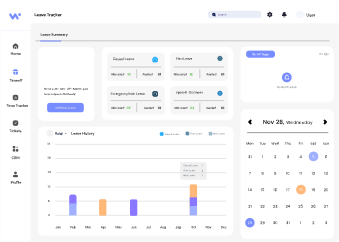
Simplify time off management for your entire team with automated approvals, smart calendars, and full transparency.
Submit PTO, sick leave, or Festival days in seconds
Automated workflows and instant notifications for Respected Ones
Always know how much time off you have left in the Year/Month.
Employee submits leave request with dates and reason.
Manager reviews and approves or requests details.
HR checks the type of leave taken and policy compliance.
Approval sent to employee in Notification and recorded in system.
Winners never quit – and with Workspace360, you’re always moving forward. Let’s build a better way to manage time off.
Explore this section to learn more about our application and find answers to your questions from our executives.
You can request time off by navigating to the Time Off section in your Workspace360 dashboard. Select your desired dates, choose the type of leave (e.g., vacation, sick, personal), and submit it for manager approval.
Y our available leave balance is displayed at the top of the Time Off page. It updates automatically as requests are approved or used.
Workspace360 supports multiple leave types including:
Vacation leave
Sick leave
Personal days
Parental leave
Bereavement leave
You’ll receive a notification via email and inside Workspace360 once your manager approves or denies your request. You can also track the status under the "My Requests" section.
Yes. If your request hasn’t been approved yet, you can edit or cancel it directly in Workspace360. If it has already been approved, you’ll need to contact your manager to make changes.